Tampilkan postingan dengan label iPhone. Tampilkan semua postingan

Senin, 30 Mei 2011

Asus PadFone Is Both a Tablet and a Phone: Neat Concept, but Still Vapor

asus-padfone At the end of the Asus press conference at Computex 2011, Chairman Jonney Shih waited until the very last minute to unveil the best product of the night: The Asus PadFone, a convergent device that docks a smartphone into the back of a slate so that they can be used together as a single device. Problem is, the entire demonstration was based on a few concept videos and a prototype that was clearly unfinished. Still, it's a usage model that we were really excited about when the Motorola Atrix made its debut and an incredibly neat approach to mobile computing�if and when Asus decides to make it available to the public.

The PadFone is essentially a symbiotic relationship between smartphone and slate, whereas the Atrix's screen and keyboard dock are intended to replace your netbook or laptop. It's a concept that owners of both Apple iPhone and iPad wish were possible: To dock the former into the latter and quit having to use two separate devices.

From the demonstration, the PadFone is inserted into the back of the dock like a cassette tape, hidden by a panel that fits flush with the back of the tablet. With the Atrix, the Smartphone sits several inches behind the screen, which simply isn't as clean-looking.

If the PadFone is anything like the Atrix, the tablet portion won't have a processor, memory, or local storage; it'll be a shell so that the two can share things like data, webcam, and 3G internet access. What makes the PadFone fundamentally different than the Atrix, however, is that it also shares the same operating system (The Atrix, when docked, runs on an alternative Linux OS). According to Asus, it's not doing any kind of upscaling or upconversion; it's using its own technology to adjust the smartphone screen layout. If you ask me, it almost sounds like it's using an internal HDMI connector.

Here's what we know for sure: The Smartphone will have the latest version of Android at the time of launch, which means so will the tablet dock. The screen size of the tablet is 10.1-inches, while the Smartphone has a 4.3-inch one. The tablet dock also has a built-in battery that will extend the life of the one in the Smartphone.

The usage scenarios are evident with such a solution: Say you're surfing the Web on the smartphone and find that the screen is too small for certain websites. You can stop what you're doing, dock the phone, and pick up where you left on the tablet. This also applies to composing email, video conferencing, and playing media. Right now, the details are so limited that it sounds like this game-changing device is still a while away. But if it does come to fruition, it could be the future of tablet computing.

PCmag

Fun video apps for iPhone

MogoVideo It doesn't seem that long ago when we would have to lug around a VHS camera to capture video of family events, vacations, and other memories we could relive later by inserting the VHS tape and hitting the play button on our VCRs. While it was a workable solution for capturing memories in motion, lugging around a video camera everywhere we went wasn't exactly practical.

Fortunately these days, there is no longer the need for fresh VHS tapes or making sure to pack the digital video camera because we have the ability to shoot reasonably good video right on our smartphones. With the iPhone 4's front- and rear-facing cameras, we have even more options for shooting videos, and with hundreds of cool video apps in the App Store, we have tons of interesting (and sometimes strange) options.

This week's collection of apps gives you some options for shooting good-looking videos. The first app lets you film the action from before you hit the record button, the second makes retro-looking videos using effects you control, and the last app gives you some professional options for shooting more-serious movies.

Mogo Video (99 cents) lets you shoot videos on your iPhone, but offers a unique twist. With Mogo Video, you can actually record action that happened before you hit record. As long as the app is on, Mogo is recording, but not saving what you see through your iPhone camera. So, maybe you think your child might take his first steps, for example. With Mogo Video turned on you can point your iPhone at your son, and when he does successfully walk on his own, you can hit the record button to capture what happened a designated number of seconds before you hit record.

Mogo seems like it might come in handy for many things beyond the above example and you get a few options to make it work better for the action at hand. Say you're watching a basketball game, as another example. You can set Mogo Video to record 10 seconds in the past so you can capture the play that leads up to a rip-roaring dunk. No longer will you need to be lucky to capture an amazing moment because the app doesn't limit the amount of time it will record in the past. But, obviously, the app won't be able to record what happened before launching the app. Along with the ability to edit the amount of time, you also can turn the flash on and off on the iPhone 4 and you can switch between the front- and rear-facing cameras.

Overall, Mogo video is an interesting concept that will come in handy in specific action-oriented situations. If you want to catch the big play, or witness a first moment with your kids without having to endlessly record the action, Mogo is a fun and effective way to capture life's exciting moments.

8mmVintage The 8mm Vintage Camera ($1.99) app lets you make old-timey videos with some cool feature variations and effects. Right when we launched this app we were reminded of popular camera app Hipstamatic, because 8mm Vintage Camera offers a vaguely similar feature set, but is instead used for making stylized videos.

Start your project by flicking the wheel in the bottom right of the screen to choose from five different video effects like the black-and-white 1920s setting or the grainy '70s setting. Then, you can swipe the viewfinder in the upper right to choose from film effects like a shaky border (like old films) or a burning effect that makes the outer edges of the film seem to melt as you shoot. Different lens and film combinations give you several options for how your video will turn out.

Unlike Hipstamatic, 8mm Vintage Camera lets you adjust all your settings on one main screen. In addition to the film and lens choices, you have the option to use the iPhone 4 flash for brighter scenes; there's a button that gives your film a frame jitter effect; and you can switch between the iPhone 4's front- or rear-facing cameras.

When you're finished, you can hit the My Reels button to browse through your shot videos, and touching a specific project gives you options for saving your video to your photo library, sending via e-mail, or uploading directly to YouTube.

Overall, 8mm Vintage Camera is one of the best apps I've found for making old-timey movies in the iTunes App Store, with just enough lens and film variations to give you plenty to experiment with. Anyone who likes old 8mm films should definitely check out this app.

FilmicPro Filmic Pro ($2.99) gives your iPhone camera a new front-end for shooting higher-quality video, with professional tools for controlling exposure, focal point, and more. As we know, the hardware and HD capabilities behind the iPhone's video camera are impressive on their own--but its built-in controls for shooting video are frustratingly primitive for more-experienced filmmakers, and the iPhone isn't always smart about handling factors like exposure and white balance.

Filmic Pro offers an interface that is clean and simple, and all of its controls run along the bottom of screen, making it perfect for keeping a steady thumb grip on your camera. On the left side of the screen, you have buttons for locking and unlocking focus, exposure, and white balance, and turning on your LED torch. On the top, in the main window, you have two reticles (or optionally one, for run-and-gun scenarios) which you can drag around to set focus, exposure, and white balance wherever you want in the shot. On the right side, you have a record button, clip library, info (a quick-start guide to the interface), and settings, which includes a ton of extras such as controls for resolution, variable frames per second, color bars, and a customizable slate with automatic advancing for each take.

Overall, Filmic Pro is a great value and worthwhile download whether you're a budding cinematographer or a filmmaking vet. This app can vastly increase the quality of your videos, letting you get much more out of your iPhone camera without adding any extra gear.

Cnet

Sabtu, 28 Mei 2011

iHome iD9 - Review

The 3-pound iHome iD9 Portable Rechargeable Speaker System charges your iPhone, iPod, or iPad while you play music, and runs off batteries when you want to use it where a power outlet is not accessible.

The iHome iD9 Portable Rechargeable Speaker System for iPad/iPhone/iPod is a simple, easy to use speaker system and charging station for your iOS devices. (For the balance of this review, I will refer to the iPad or iOS devices to cover all of them.) It charges your iOS device while you play music, and runs off batteries when you want to use it where a power outlet is not accessible.

The Package

id9_3quarters The box contains only three items: The iD9, an A/C adapter, a pair of small rubber bumpers, and a plastic bag with two short manuals � one in French and one in English. iHome warns that the initial charge of the battery can take up to six hours. The unit I received came partially charged, so I finished the initial charging in about 80 minutes.

The power supply for the iD9 is a �wall wart� with a round connector. I would have preferred an USB-based power system, but the power supply is rated at 25W (2.75A at 9V), which is about 10x more power than a single USB port can provide.

Set Up

id9-controls The iD9 is easy to set up, and measures 12.9 x 2 x 4.06 inches. It doesn't seem that heavy, but it weighs 3 1/4 lbs. I think it is rather large for a portable speaker. On the front are two controls�the switches on the left raise and lower the volume, and the power switch is on the right with the battery charge indicator.

iHome provides a pair of small rubber bumpers, which are about 2" long and 1/8" wide and thick. They are designed to go into a pair of small depressions in the docking area of the iD9 and support your iPad when it is on the dock. If your iPad lives in a case, the case may be thick enough on the bottom so that the bumpers are not necessary.

iHome also sells an optional remote ($20) that allows you to control the operation of the iD9 from a distance. If you choose not to purchase the remote, iHome has put a switch on the back of the unit that lets you conserve power when on battery, by not powering the receiver for the remote. I did not receive the remote for this review.

The iD9 has a rubber base that keeps it from slipping around on smooth surfaces. This is a nice feature, since the last thing you want to happen when dock your iPad is to have the dock slide away from you. However, the instruction booklet that comes with the iD9 suggests that you: �Protect your furniture when placing your unit on a natural wood and lacquered finish. A cloth or other protective material should be placed between it and the furniture.� I tried that, and it defeated the purpose of having the rubber bottom on the unit; when I tried to insert the iPad one-handed, the iD9 slid off my desk.

id9_withphone I was unable to dock an iPad 2 into the iD9. The curved back of the iPad 2 prevents the dock connector from pivoting into the correct orientation. iHome has an adapter that allows you to use the iD9 with the iPad 2, but you have to 1) know that it exists, and 2) go to a particular page on iHome�s site to request the adapter, and 3) wait for them ship you the adapter. The adapter is not mentioned in the documentation or on the iD9 product page. iHome says that the iPad 2 insert will be included in all new production units.

Sound

The sound that the iD9 produces is quite nice; I had no complaints. It reproduced the fine structure of guitar and drum solos. While it didn't "rock the house" on a heavy bass track, it did better than I expected for a set of portable speakers. iHome has incorporated SRS TruBass and Reson8 technologies into the iD9 for improved sound, but says nothing on how the technologies work.

When I played the MacNN audio test MP3 files, I could hear the pure 12K Hz tone, and my daughter could hear the 13K Hz and 14K Hz tones as well. On the bottom end, it played the 20 Hz tone without much distortion.

Battery Power

The internal battery on the iD9 is designed to play your music, not to charge the iPad. I set up a fully charged iPod nano and iD9, and put it on shuffle and repeat, with the volume at about 25%, suitable for a quiet room. The iD9 has four indicator lights on the front to show the level of battery remaining. The first light went out at three hours, the second at about 6 hours 15 minutes, so I'm extrapolating that to estimate that you get between 12 and 13 hours of battery life - longer than your iPad will last.

There is also a line-in jack on the back for playing music from other sources. The manual mentions that you shouldn't plug something into the line-in jack while playing music from a docked iPad, otherwise you could get sound from both sources at the same time.

id9_schematic There is really very little complexity to the iD9. You attach in your iOS device and play - either while plugged into the power supply or on battery. If you have an iPad 2, I would not recommend these speakers, due to the problems with the dock connector. While I like this speaker system, iHome doesn�t make it clear that it isn�t compatible with the iPad2 out of the box and it is over a foot long.

The iD9 has a list price of $99.99 and is available direct from iHome as well as several online retailers. iHome also has two iOS applications that they claim work well in concert with the iD9. I tested the free alarm clock app iHome+Sleep, which worked well, even without the iD9 attached to my iPad. I did not test the iHome+Radio app ($1.99) that lets you listen to Internet radio.

Macnn

Review: iHome iD9

The 3-pound iHome iD9 Portable Rechargeable Speaker System charges your iPhone, iPod, or iPad while you play music, and runs off batteries when you want to use it where a power outlet is not accessible.

The iHome iD9 Portable Rechargeable Speaker System for iPad/iPhone/iPod is a simple, easy to use speaker system and charging station for your iOS devices. (For the balance of this review, I will refer to the iPad or iOS devices to cover all of them.) It charges your iOS device while you play music, and runs off batteries when you want to use it where a power outlet is not accessible.

The Package

id9_3quarters The box contains only three items: The iD9, an A/C adapter, a pair of small rubber bumpers, and a plastic bag with two short manuals � one in French and one in English. iHome warns that the initial charge of the battery can take up to six hours. The unit I received came partially charged, so I finished the initial charging in about 80 minutes.

The power supply for the iD9 is a �wall wart� with a round connector. I would have preferred an USB-based power system, but the power supply is rated at 25W (2.75A at 9V), which is about 10x more power than a single USB port can provide.

Set Up

id9-controls The iD9 is easy to set up, and measures 12.9 x 2 x 4.06 inches. It doesn't seem that heavy, but it weighs 3 1/4 lbs. I think it is rather large for a portable speaker. On the front are two controls�the switches on the left raise and lower the volume, and the power switch is on the right with the battery charge indicator.

iHome provides a pair of small rubber bumpers, which are about 2" long and 1/8" wide and thick. They are designed to go into a pair of small depressions in the docking area of the iD9 and support your iPad when it is on the dock. If your iPad lives in a case, the case may be thick enough on the bottom so that the bumpers are not necessary.

iHome also sells an optional remote ($20) that allows you to control the operation of the iD9 from a distance. If you choose not to purchase the remote, iHome has put a switch on the back of the unit that lets you conserve power when on battery, by not powering the receiver for the remote. I did not receive the remote for this review.

The iD9 has a rubber base that keeps it from slipping around on smooth surfaces. This is a nice feature, since the last thing you want to happen when dock your iPad is to have the dock slide away from you. However, the instruction booklet that comes with the iD9 suggests that you: �Protect your furniture when placing your unit on a natural wood and lacquered finish. A cloth or other protective material should be placed between it and the furniture.� I tried that, and it defeated the purpose of having the rubber bottom on the unit; when I tried to insert the iPad one-handed, the iD9 slid off my desk.

id9_withphone I was unable to dock an iPad 2 into the iD9. The curved back of the iPad 2 prevents the dock connector from pivoting into the correct orientation. iHome has an adapter that allows you to use the iD9 with the iPad 2, but you have to 1) know that it exists, and 2) go to a particular page on iHome�s site to request the adapter, and 3) wait for them ship you the adapter. The adapter is not mentioned in the documentation or on the iD9 product page. iHome says that the iPad 2 insert will be included in all new production units.

Sound

The sound that the iD9 produces is quite nice; I had no complaints. It reproduced the fine structure of guitar and drum solos. While it didn't "rock the house" on a heavy bass track, it did better than I expected for a set of portable speakers. iHome has incorporated SRS TruBass and Reson8 technologies into the iD9 for improved sound, but says nothing on how the technologies work.

When I played the MacNN audio test MP3 files, I could hear the pure 12K Hz tone, and my daughter could hear the 13K Hz and 14K Hz tones as well. On the bottom end, it played the 20 Hz tone without much distortion.

Battery Power

The internal battery on the iD9 is designed to play your music, not to charge the iPad. I set up a fully charged iPod nano and iD9, and put it on shuffle and repeat, with the volume at about 25%, suitable for a quiet room. The iD9 has four indicator lights on the front to show the level of battery remaining. The first light went out at three hours, the second at about 6 hours 15 minutes, so I'm extrapolating that to estimate that you get between 12 and 13 hours of battery life - longer than your iPad will last.

There is also a line-in jack on the back for playing music from other sources. The manual mentions that you shouldn't plug something into the line-in jack while playing music from a docked iPad, otherwise you could get sound from both sources at the same time.

id9_schematic There is really very little complexity to the iD9. You attach in your iOS device and play - either while plugged into the power supply or on battery. If you have an iPad 2, I would not recommend these speakers, due to the problems with the dock connector. While I like this speaker system, iHome doesn�t make it clear that it isn�t compatible with the iPad2 out of the box and it is over a foot long.

The iD9 has a list price of $99.99 and is available direct from iHome as well as several online retailers. iHome also has two iOS applications that they claim work well in concert with the iD9. I tested the free alarm clock app iHome+Sleep, which worked well, even without the iD9 attached to my iPad. I did not test the iHome+Radio app ($1.99) that lets you listen to Internet radio.

Macnn

Kamis, 26 Mei 2011

Motorola Atrix 4G Review

Check out our Motorola Atrix 4G review inside. Is AT&T's new flagship the ultimate business smartphone?
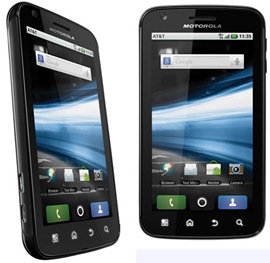
motorola-atrix-4g Motorola Atrix 4G Report

There are few phones that can contend with the Motorola Atrix 4G. It is a breed of its own. First off, this dual-core warrior is exceedingly versatile, courtesy of various accessories like Laptop, Multimedia, or Vehicle docks. Want to work from home using your work computer? That's what the laptop dock is for. Need a GPS unit in your car? That's what the Vehicle dock is for. Streaming 720p HD videos to HDTVs? The Multimedia dock. But then let's take a look at what's under the hood. A gig of RAM, 16GB of NAND flash, 5-megapixel camera with 720p HD video recording, and a whopping 1930mAh battery pack that churned out the best battery life we've seen on a smartphone to date. Yes, the Motorola Atrix 4G (specs) is a worthy adversary of the iPhone 4 and HTC Inspire 4G.

Design

Given our penchant for motorcycles, certain materials like titanium, stainless steel, and carbon fiber really light our Bunsen burners. Well, it happens to sport a back panel with a faux carbon fiber pattern, and that sold us on the spot. Not only does the phone look slicker than snail snot, but it's almost identical in size to the iPhone 4. Although it is slightly wider, we really didn't notice it while it hid out in our pocket. Besides, the phone's larger 4-inch qHD touchscreen was worth the miniscule width boost compared to the iPhone 4's 3.5-incher. Want to talk graphics? The Atrix 4G's screen is right up there with Apple's Retina display.

You'll also notice that this smartphone mounts its HDMI and USB terminals within close proximity of each other, and that's because they serve as the terminals for dock connections. Also, we weren't fans of the Power/Lock button at first, due to its recessed and hard to reach design. However, we quickly realized the benefit to this architectural divergence, and did not inadvertently toggle the phone while it sat in our pocket. A few other highlights are the Atrix 4G's front-facing VGA camera, four haptic feedback buttons consisting of Menu, Home, Back, and Search, and its 16GB of built-in NAND flash with supplemental MicroSD card slot. Obviously, the phone's 1930mAh battery and 5-megapixel camera with dual LED flash stole the show when it came to performance.

Software and Interface

Like so many Android devices in this current state of time, the Atrix 4G runs Android 2.2, which specializes in the full Google spectrum with Flash 10.1 support for the browser. But when we look at the phone's interface, that's a different story. The big player seems to be HTC Sense these days, but the Atrix 4G, being a Motorola phone, runs MOTOBLUR. MOTOBLUR is more of an acquired taste, as it specializes in social networking and the conjoining of various accounts into one centralized mass. MOTOBLUR is not as refined as iOS 4 or HTC Sense, but it's universal enough to appeal to a broad spectrum of users. The phone is fast with its NVIDIA Tegra 2 dual core processor (1GHz at each core) and 1GB of RAM.

With that said, the phone has 7 Home screens with the ability to add Motorola Widgets, Android Widgets, Shortcuts, Folders, or Wallpapers with a prolonged press and hold on any screen. We have the classic Android dropdown menu and a vertically-scrolling Applications menu that is easily accessed via the circular button wedged between the large Phone and Contact buttons. The neat thing about MOTOBLUR is that once you sign up, it will remotely save your settings. For instance, we were able to retain all of our signed in accounts just by signing in once to our MOTOBLUR account, so that was a plus.

Internet

The Motorola Atrix 4G is blessed with one of the better browsers out there. It's not as sleek as the HTC Sense browser, but it's quick and smooth. We get pinch-to-zoom and double-tap-to-zoom with text wrapping, and response time is great. Also, Flash 10.1 support allowed us to watch our YouTube reviews right from within the browser, lag-free. The phone comes with Vlingo, which is a speech-based phone search application that enabled us to search anything online or send emails via voice. We tested Vlingo, and it worked very well. Overall, the phone's HSPA+ speeds were well up to snuff, and Wi-Fi connectivity enhanced our browsing even further.

Multimedia and Productivity

With Quickoffice right out of the box, the Atrix 4G allowed us to work on Microsoft Office documents via the exceptionally welcoming keyboard. We were able to fly through sentences on Motorola's keyboard, and it heightened our level of productivity significantly. Thanks to our MOTOBLUR experience, the Atrix 4G offered a Universal Inbox, which combined all of our emails, messages, and other correspondence from various accounts like Gmail, Facebook, MySpace, and Twitter. This had a tendency to be overbearing, but our Account synchronization was flexible. The Atrix 4G also proved itself as a solid multimedia phone, handling 3D games with ease, thanks to its accelerometer and tasty dual-core action. The phone offers DLNA for streaming content onto other wireless devices and Media Share, which aided In the transferring of files to other devices.

Call Quality/Battery Life

Battery life is one of the Atrix 4G's primary strengths, as its 1930mAh rechargeable lithium ion battery pack cranked out the best smartphone longevity performance we've ever seen. This could not just be attributed to the phone's larger battery pack, but also its power management. There are three flavors to choose from: Maximum Battery Saver, which stops syncing data after 15 minutes of inactivity and dims the display. Then Nighttime Saver functions the same, only it allows full syncing throughout the day. Performance Mode is obviously geared for the minute-to-minute syncer, and uses the most battery power. However, we used Maximum Battery Saver and our Motorola Atrix 4G review unit lasted for days on standby. Holy moly. Yes, this phone is a marvel of battery craftsmanship.

That being said, voice quality paled in comparison. It was decent enough, but with connectivity to a nearby AT&T tower, we have heard better. That's not to say the Atrix 4G did not perform well�calls were perfectly acceptable. However, it could not match the noise-canceling goodness of the HTC Droid Incredible 2.

Accessories

Now let's talk accessories. No other phone on the market is compatible with the level of device-specific accessories that are available for the Atrix 4G. We were sent the Laptop dock and Multimedia Dock. We'll start with the Laptop Dock, which operates by plugging it into the USB and HDMI prongs located behind the display. We could view and control all action on the phone via Mobile View, which was represented in an individual window, or we could pop over to Firefox or Facebook for full browser-like experiences.

There was also a File Manager for easier control of our phone files and we could make calls through the phone in a skype fashion usin an on-screen dialer. For media, we got Motorola's Entertainment Center, which combined all of our images, videos, and music into one snazzy interface with the support of HD. Add in the fact that we could use Citrix to work remotely from the office�ideal for "sick days"�and the Laptop Dock was probably the most useful accessory. Oh, and don't forget the Bluetooth keyboard and mouse that Motorola sent us either.

We were also shipped a Multimedia Dock, which came equipped with three USB terminals, an HDMI port, and other clutch forms of connectivity. With the Multimedia Dock, we found it was best to set it next to an HDTV and hook the Atrix 4G up for 720p action, though we did not feel that the Multimedia Dock was a necessity, or as functional as the Laptop Dock. Then there was the Vehicle Dock, which transformed the Atrix 4G into a car GPS. This was a bit more useful, and we're sure Garmin must be very angry.

Camera

The phone has a 5-megapixel camera with dual LED flash and 720p HD video recording. We tested the Atrix 4G against the T-Mobile G2x, and the G2x blew it away. That's not to say that the Atrix did not crank out a decent image performance. Bright light was good, and the phone had a modest amount of manual controls, Scene modes, and effects. Unfortunately, the Atrix 4G lacked touch focus and we could not toggle the video light on or off while recording. Also, low light sensitivity lacked significantly, especially when compared to the awesome power of the G2x's 8-megapixel sensor. The bottom line was that the Atrix 4G's camera was sufficient enough for most users, but those looking for a camera as the primary feature in a phone will want to check out the T-Mobile G2x or iPhone 4.

Motorola Atrix 4G � infoSync Diagnosis

This phone is an example of innovative thinking brought to the forefront of modern smartphone technology. We have a dual-core demon with 1GHz of RAM, fantastic battery life, and compatibility with accessories out the wazoo. The Atrix 4G will make working from home a breeze, thanks to the Laptop Dock, and can navigate your car wherever it needs to go, courtesy of the Vehicle Dock.

We are typically weary of phones that are compatible with a multitude of device-specific accessories, but the Atrix 4G proved itself as a worthy candidate. Though the phone could use a little boost in voice quality and camera quality, its overall package did not cease to impress us.

If you're looking for a great iPhone alternative, the Motorola Atrix 4G should be the first stop on your map, followed by the HTC Inspire 4G. Motorola really hit a home run with this phone, and we can't wait to see the follow-up to this model.

Infosync

Apple: Galaxy S II, new Galaxy Tabs copy iPhone, iPad too

Apple in a filing late last week (below) is now known to have brought Samsung's latest devices into its lawsuit against design copying. An expedited but limited discovery order will let its attorneys look at all of the devices that Samsung is just now putting into the market, including the Galaxy S II, Galaxy Tab 8.9 and 10.1, the Infuse 4G, and the Droid Charge. Lawyers wanted to gauge whether or not these too infringed on Apple's patent or trade dress claims and argued that comparisons were already being made between the S II and the iPhone 4 as well as the Galaxy Tab 10.1 and the iPad 2.

Judge Lucy Koh was inclined to side with Apple that there was a "reasonable basis" to inquire whether Samsung was designing hardware to look like the iOS devices. Apple gave a particularly condemning example when Samsung mobile VP Lee Don-Joo signaled that Samsung would change the Tab 10.1 design to beat Apple on thinness and, just three weeks after the iPad 2 was unveiled, had a tablet design just slightly thinner where its original model, shown just over two weeks before the iPad 2, was thicker.

Samsung had tried to object on the grounds that some of its products hadn't been released at the time of the original notice of an intent for the order, on April 20. Judge Koh dismissed this as all of the products had already been given official public appearances, including in person. She added that Samsung had even given out 5,000 Galaxy Tab 10.1 Limited Edition models at Google I/O on May 10, leaving members of the regular public with the final design in their hands.

The ruling gave Samsung a minor concession in saving Samsung executives from having to provide depositions on the devices, saying it would be "unduly burdensome" to have them cover so many topics with relatively little warning.

Apple's win may compound Samsung's troubles in the case. Although there are conspicuous differences, Samsung's device lineup has had design traits not seen on other Android phones that are conspicuously like that of the iPhone, including a large central home button and icons on the Samsung-specific TouchWiz interface that are only slightly different than their Apple equivalents.

iphone4-earlylg1

Electronista

iPhone 4S back supposedly turns up

Chinese outfit WeiBusi on Tuesday posted a photo of what's purported to be the back of the next iPhone, which many are tentatively referring to as the iPhone 4S. The white shell matches up with that of a very early case design and, in keeping with recently mentioned parts, points to a moved camera flash that sits opposite the camera itself. The design superficially resembles that of an iPhone 4, although that couldn't be verified without the rest of the body.

The backing isn't necessarily accurate and could have been visually edited. Apple isn't believed to be starting production until July and might at most have part samples rather than full components.

Debates still persist over what the next iPhone will look like. While some have been arguing for a conservative update that mostly focuses on upgrading the inside, France Telecom's CEO understood it would be smaller and thinner and noticeably different. Other rumors have pointed to a substantial redesign.

Electronista

Selasa, 24 Mei 2011

LG Phoenix (AT&T)

LG-Phoenix LG's value-priced Optimus One smartphone has finally made it over to AT&T. Dubbed the Phoenix here, it lets bargain hunters step to a real Android cell phone for just $29.99 with a two year contract. At this price, the Phoenix does the job just fine. But AT&T subscribers also have the ability to get a $49.99 Apple iPhone 3GS (4.5 stars), which makes the Phoenix a bit less compelling than its siblings on Sprint and T-Mobile.

Design, Call Quality, and Apps

The LG Phoenix measures 4.5 by 2.3 by 0.5 inches (HWD) and weighs just 3.2 ounces. That's light for an Android phone, and this is the lightest Optimus variant by far. It's made mostly of a soft touch, slate blue plastic that's comfortable to hold. The 3.2-inch capacitive touch screen offers 320-by-480-pixel resolution; it's bright, if not particularly smooth to the touch, but it does the job. Four backlit, plastic function buttons sit beneath the screen, and have just the right amount of give. The on-screen QWERTY keyboards are a little cramped, but LG redesigned the keyboards to have slightly larger keys. The typing experience was okay; other phones are roomier and a bit more responsive.

The LG Phoenix is a quad-band EDGE (850/900/1800/1900 MHz) and tri-band HSDPA 7.2 (850/1800/2100 MHz) device with 802.11b/g Wi-Fi. You can also use it as a mobile hotspot for up to five devices with the appropriate optional data plan. LG's Optimus phones usually sound good with voice calls, and the Phoenix is no exception. Callers said I sounded clear through the microphone. Aside from the occasional computerized-sounding syllable, everyone sounded fine to me too. Reception was average. Calls sounded clear through an Aliph Jawbone Icon ($99, 4 stars) Bluetooth headset. Voice dialing worked fine over Bluetooth without training. The speakerphone sounded clear but needs more gain. Battery life was quite good at 6 hours and 30 minutes of talk time.

With the Phoenix, AT&T requires its usual minimum data plan starting at $15 per month. The Phoenix's Android credentials are fully intact: you get free voice-enabled, turn-by-turn GPS navigation, a great stock WebKit browser, powerful webmail and Microsoft Exchange integration, and access to over 150,000 third-party apps in the Android Market. The Phoenix runs Android 2.2 (Froyo). Although it packs an older Qualcomm MSM7227 600 MHz ARM11 processor, the device is responsive enough in day-to-day operation, in part thanks to LG's relatively light hand on the UI. The Phoenix isn't particularly fancy, but I'd have no problem using it as my personal smartphone.

Multimedia, Camera, and Conclusions

The microSD card slot is located underneath the battery cover; my 32GB SanDisk card worked fine, and LG throws in a 2GB card to get you started. There's also 162MB of free internal memory. Music tracks sounded clear and punchy through Samsung Modus HM6450 ($99, 4 stars) Bluetooth headphones. The stock music player displayed album art clearly and was simple to navigate. Standalone videos played well in full screen mode, though 720p files failed to play at all. The Phoenix isn't the best portable video player anyway, given its smallish LCD and somewhat subdued colors.

The 3.2-megapixel auto-focus camera has no flash. Test photos looked good, but not great; the same as with other LG Optimus phones. The camera sensor picks up a reasonable amount of detail, and outdoor shots looked relatively natural. But indoor shots in dimmer lighting exhibited too much grain. Recorded 640-by-480-pixel videos looked okay and played relatively smoothly at 18 frames per second, though the lack of image stabilization means you'll need a steady hand.

Our Editors' Choice for AT&T smartphones remains the Apple iPhone 4 ($199, 4 stars), but a better point of comparison here would be the iPhone 3GS. It costs just $20 more than the Phoenix; for that, you get access to the best app store in the industry, including much better gaming support, and it's also a real iPod. The Phoenix shares the iPhone 3GS's screen resolution, although the Phoenix's panel itself is a bit smaller. On the other hand, the Phoenix beats the iPhone with its free GPS navigation and smoother integration with Google services. Make no mistake, this is the best entry-level Android phone. But we'd keep an eye on prices for higher-end Android phones like the HTC Inspire 4G ($99, 4 stars) and Samsung Captivate ($99, 4 stars), both of which offer faster processors and larger, higher-resolution screens. Considering the high price you're paying per month, it may be worth it to pay a little bit more up front for a more powerful phone.

Benchmarks

Continuous talk time: 6 hours 30 minutes

Pcmag

Jumat, 20 Mei 2011

Verizon CFO Reveals iPhone 5 Details

In an interview with Reuters, Verizon Chief Financial Officer Fran Shammo said his company's version of the next Apple iPhone, the so-called "iPhone 5," will be a global phone, working in the same countries as the AT&T model.

That would mean the Verizon iPhone 5 would be able to make calls on both CDMA and GSM networks. The device would still be native to Verizon's network, using GSM only when roaming. The AT&T version might also have both radios, though it would only need GSM to be considered a global phone.

The current Verizon iPhone 4 is CDMA-only, so it doesn't work in countries where there are only GSM networks, which includes most of Europe, Africa, and parts of Asia. The AT&T version works on most GSM networks, which are much more common.

Shammo also said Verizon would be able to launch the iPhone 5 at the same time as AT&T, all but confirming a simultaneous launch on both carriers.

Very little is known about the next iPhone, although iPhone 5 rumors are rampant. If Apple sticks to its typical product cycle, it should be unveiled soon with a debut next summer, although there are reports that because of production difficulties, it won't hit stores until September.

On whether or not the Verizon iPhone 5 would be able to ride Verizon's new high-speed LTE network, Shammo was fairly mum: "I think it's a bigger issue for Apple than it is for us," he told Reuters. "Depending on where Apple plays, that's where we'll sell."

PCmag

Kamis, 19 Mei 2011

Toshiba Creates Phone Display With Highest Pixel Density Ever

The iPhone 4's crown of having the highest-density screen among smartphones could soon be usurped. Toshiba just unveiled a 4-inch screen with a density of 367 pixels per inch (ppi), making it the highest pixel density for any commercial display.

When Apple first showed the iPhone 4 last year, Steve Jobs famously proclaimed its 326ppi screen as a "retina" display, implying that it was so sharp, it was beyond the point where the human eye was able to discern the pixels. Those claims were later said to have been exaggerated, though the display is still notable for having the highest pixel density among phones.

The Toshiba screen, a low-temperature polysilicon (LTPS) display that was shown this week at a trade show in Los Angeles, bests the iPhone 4's 3.5-inch 960x640 LCD with a 4-inch 1,280x720 screen. That's enough pixels to play 720p HD video at full resolution�on a phone.

The achievement, while technologically impressive, has questionable applicability. It would be difficult for most to see any actual difference in resolution between a 326ppi display and a 367ppi one.

Still, having the highest-resolution screen in a category is a talking point that Apple has shown can be a useful marketing tool, and phone makers will no doubt implement Toshiba's high-density screen in some the high-end handsets of tomorrow, possibly even Apple. Apple's current supplier for the iPhone 4 display is LG, although the company is rumored to be working with Toshiba on the next generation of the device.

Does that mean Toshiba's 367ppi screen could make its way into the next iPhone? It's possible�Apple is also rumored to be completely redesigning the iPhone for the next model to accommodate a 4-inch screen, but a shift from the current 1.5:1 aspect ratio to a widescreen one (like the Toshiba screen has) is unlikely since it would affect all apps, which have already been designed for the original ratio. If the rumors are true, however, that could mean Toshiba has a different display, with an iPhone-like aspect ratio, in the works.

The new display follows on the heels of Samsung's unveiling of a 10-inch "retina" screen for tablets with 2560x1600-pixel resolution. If the trend toward ever-higher resolution continues, mobile devices that can display full 1080p resolution video could become common�as long as their processors can keep up.

PCmag

Senin, 16 Mei 2011

Rumor: New "iPhone 4S" Launching on T-Mobile and Sprint, Too?

Apple rumormongering: Go! A new research note from Jefferies & Co analyst Peter Misek suggests that Apple isn't going to be performing a significant upgrade to the connection capabilities of its new, to-be-released iPhone�namely, no 4G LTE support.

Whenever the next version of Apple's smartphone hits the market�we're already nearing the one-year anniversary of the iPhone 4's launch with no hint of a new product in sight�Misek suggests that the device will only have incremental upgrades compared to the iPhone 4's specifications. Heck, it's practically keeping the same name.

"We believe the likelihood of the iPhone 5 launch in September including LTE [Long-Term Evolution] is now remote," wrote Misek in a research note on May 13. "According to our industry checks, the device should be called iPhone 4S and include minor cosmetic changes, better cameras, A5 dual-core processor, and HSPA+ [EvolvedHigh-Speed Packet Access] support."

The bigger news on Apple's side is Misek's suggestion that the company will be pursuing an expanded carrier lineup for its iPhones. His "industry checks" indicate that Apple will be launching the iPhone on both Sprint and T-Mobile in time for the holidays�remember, although the latter is in the process of being purchased by AT&T, T-Mobile currently remains a separate company from the larger carrier. In other words, no iPhone� yet.

As for when the new iPhone is expected to actually hit the market�looking cosmetically similar to the iPhone 4, as indicated by current rumors�that's anyone's guess. While anonymous sources speaking to Reuters in an April 2011 article suggest that the iPhone 5 (or iPhone 4S) is expected to drop in September of this year, other rumors peg the next version of Apple's smartphone to ship just in time for the holidays.

So why new carriers, but not LTE support for the new iPhone-whatever? In actuality, Apple was allegedly planning to support full-fledged LTE in the iPhone via a Qualcomm chipset, but Misek says that chip yields just haven't been strong enough for Apple to be able bring LTE support into the picture just yet. While not explicitly stated by Misek, the iPhone 4S seems like it was Apple's "backup plan" in case a full LTE-enhanced iPhone couldn't come to pass.

PCmag

IPhone 5G Sighting Shows Edge-to-Edge Screen

What's purported to be an "iPhone 5G" case with an edge-to-edge screen has surfaced at Asian trading site AliBaba.com, Electronista reported Saturday.

iphone_5_mock_up The listing on Guangdong, China-based Kulcase's trading site shows the front and back of what it claims to be the "Newest design crystal case for apple iPhone 5g." The unconfirmed case mockup is colored teal�we're guessing that odd choice doesn't make Apple's final cut for the iPhone 5�and has the flash component moved away from the rear camera, which would be a change from earlier versions of the iPhone.

The steady drumbeat of rumors about Apple's plans for the iPhone 5 seem to have fallen off in the past few weeks. But in March and April, speculative stories about delays, a faster processor and the like were flying off the shelves.

One thing that lends some credence to the AliBaba.com sighting is that Apple has already had trouble keeping its case designs for new products under wraps, notes AppleInsider.

Three employees of Apple manufacturing partner Foxconn Electronics were reportedly charged in March with leaking the iPad 2's case design to third-party accessory suppliers.

The workers, employed at Foxconn's Shenzen, China plant, were arrested by Chinese authorities on Dec. 26, 2010 and officially charged with violating company trade secret regulations on March 23, according to reports.

Foxconn, a subsidiary of Hon Hai Precision Industry, assembles iPads, iPhones and iPods for Apple.

Images of iPad 2 cases featuring a rear-facing camera and a thinner profile than the first-generation media tablet from Apple began to surface last December. At the time, Foxconn reported its suspicions that the design had been leaked by its own employees, according to reports.

PCmag

iPhone '5G' case shows edge-to-edge screen, moved flash

iphone4s-caseleakA very early instance of a 2011 iPhone case has shown up in a listing at Asian trading site AliBaba. Guangdong-based Kulcase is selling what it claims is a crystal case for an "iPhone 5G." The construction and the placeholder inside it suggest not only a larger, edge-to-edge screen but that the flash has moved from directly next to the rear camera to the corner on the other side, presumably to improve its performance.

Whether or not the case is accurate is difficult to determine. Some rumors have pointed to a radical overhaul of the iPhone for this year that would support the existence of an edge-to-edge screen and possibly other changes. Others have pointed to just a modest iPhone 4 respin, although at least one of these has referenced an edge-to-edge display.

A side glance isn't available and would help determine the plans, since the argument for a major redesign has pointed to a tapered shape.

Small Chinese companies have, in the past, regularly and illegally obtained Apple design blueprints in advance and started manufacturing cases even when it turned out the design changed slightly before launch. The problem was finally acknowledged this year when Foxconn had employees arrested for passing on iPad 2 information months in advance. A company from Guangdong in the mainland would be an unusual choice given its distance from Foxconn's usual factories, although the cases themselves would ship out of the port of Shenzhen, Foxconn's core manufacturing base.

The new iPhone, regardless of design, isn't anticipated until September but would start manufacturing in July and might give time for early schematics to show.

 Electronista

Analyst claims iPhone 4S due with HSPA+ 3G, Sprint version

Jefferies analyst Peter Misek claimed in a research note Friday that claimed to know details of the next iPhone. Saying that the phone was now called the iPhone 4S, he referred to "industry checks" that supported what had been rumored so far but also mentioned HSPA+ 3G support on GSM networks, implying 21Mbps. He was also told network support would expand to carriers that had been actively seeking it, including Sprint's CDMA network, T-Mobile's uncommon HSPA+ bands, and China Mobile's unique TD-SCDMA.

Most else of what he mentioned was mentioned in the past, such as better cameras, the dual-core A5 processor, and a design that could be just a minor revision of the iPhone 4. Apple wanted to include an LTE chipset, according to Misek, but wasn't ready.

Analyst claims of inside knowledge are frequently mixed and can be inaccurate. Most of what was said in the Jefferies note, however, matches with more concrete claims. HSPA+ 3G is now a common feature on HTC and Samsung phones and was already coming to phones from RIM and others. An iPhone 4-like prototype was already seen (above) running on T-Mobile USA's 3G, and talk has repeatedly surfaced of a deal with China Mobile.

Sprint is less certain, but it's technically capable of using CDMA. The company has been elusive on the subject but has always alluded to there being talks. Verizon has emphasized that it doesn't have an exclusive and may have just had the advantage of an early deal.

Electronista

iPhone 4 sets Guinness records for game handheld sales

Guinness World Records upturned expectations late Thursday by giving Apple three records for gaming. The iPhone 4 was now the fastest-selling handheld game system ever, having reached an estimated 1.5 million devices on its first day. Officials noted that just 200,000 Sony PSPs moved on its launch day, and the DS took a full week to hit 500,000.

The 3DS hit 400,000 in one day but quickly tapered off in the following days.

Apple also clinched a record for the largest downloadable game store. Even as of September 2010, the App Store had 37,362 games. Nintendo's Virtual Console store for classic games hit just 576 titles, while Steam had about 1,100 games at the time and Xbox Live Arcade's indie section had 1,300.

The App Store belatedly claimed a third title, for the largest launch lineup of any game platform. Although the total App Store only had 500 titles, 145 of those were games. Most consoles just ship with one to two dozen titles at best.

Guinness' records could bring criticism from gamers and companies, many of whom have argued that the iPhone and Android aren't offering substantial games. Guinness' gaming lead Gaz Deaves disagreed and argued that Apple had simply carved out a "gigantic new space" and helped establish casual gaming.

Game system designers have increasingly felt the impact in spite of initial attempts to deny an effect. Nintendo's profit dropped 66 percent, partly after it could no longer count on constantly rising DS sales.

For Apple, the trio of records may be a form of retaliation against Microsoft's fastest-selling device record from March.

Electronista

Selasa, 10 Mei 2011

White iPhone 4 Launch Turns Violent at Beijing Store

In China, it appears Apple fanboys are so eager to snap up the new Apple products that some of them will resort to violence. Multiple sources are reporting that the launch of the white iPhone 4 caused a skirmish outside the China's flagship store in the Sanlitun neighborhood of Beijing.

According to a CNN report, after a man believed to be a scalper tried to jump the line to buy the white iPhone, three Apple security members tried to escort the man away, and a fight broke out. A "shoving match" between an Apple staffer and a relative of the alleged scalper resulted as he was removed from the line. The fight caused Apple security to close and lock the entrance of the store. Zealous customers rushed the glass door, and as they tried to shake it open, it shattered.

Two men and two women reportedly suffered minor injuries in the scuffle. Apple closed the store for the rest of the afternoon.

"The Apple store in Sanlitun closed for several hours on Saturday after a group outside the store became unruly," Carolyn Wu, a Beijing-based Apple spokesperson told CNN. "The store team acted to protect themselves and our customers by closing the doors and preventing the group from entering. The safety of our customers and our employees is our top priority."

As of Sunday, customers in Beijing that want a white iPhone 4 must first make a reservation online, the Wall Street Journal is reporting. No reservation is necessary to snag a black iPhone 4.

It seems that white iPhone-related violence isn't an isolated situation. The launch of the iPad 2 reportedly caused a brawl to break out as well. There have also been problems with scalpers hawking Apple products in the country in the past.

Demand for Apple products has grown massively in China since the country's first store opened nearly three years ago. Chinese Apple stores are some of the busiest in the world. The AP reports that on average, Chinese locations have both the highest traffic and highest revenue among all Apple stores. When Apple reported its Q1 earnings last month, it said that quarterly revenue from China quadrupled, soaring to $2.6 billion, or about 10 percent of the company's total revenue.

PCmag

Google Nexus S 4G gets update a day after launch

The Google Nexus S 4G that just arrived at Sprint stores this past weekend has already got a maintenance update. According to a Sprint forum posting, the software release is called GRJ22 and includes improvements to performance and security, international roaming when using Google Voice, and the use of the Tags app for NFC when communicating between two Nexus S handsets.

The update is said to take about five minutes to install. The update is being released over the air and being pushed out in stages. Users can get it faster by checking manually.

The handset reportedly ships with Android 2.3.4 and Sprint explains that waiting for the update would delay the launch, so the carrier instead chose to ship it on time and release the update as soon as it was ready.

The Nexus S 4G costs $200 on a two-year contract and is similar to the original T-Mobile version aside from the necessary network switches to CDMA and WiMAX.

Electronista

Senin, 09 Mei 2011

review: Photojojo Telephoto Lens for iPhone 4 camera (and 3G/3GS)

It�s a well-known fact that the digital zoom on the iPhone, even with the higher megapixel of the iPhone 4, is terrible if you use it to fully zoom in on an image. That�s why sometimes we end up taking a picture from far away, with a bit of zoom, and then perhaps crop it out later in a photo editing app.

Not anymore!

PhotojojoTelephoto Photojojo has developed an actual telephoto lens for the iPhone 4 (as well as the iPhone 3G/3GS and Verizon model iPhone 4) that can attach itself to a protective case.

The case itself is a thin, plastic shell that covers the iPhone from the sides. On my iPhone 4, the top and the bottom are not protected. However, there is a space on the side for full access to the volume and ringer buttons. The back will have a precise cutout for the camera and flash, but there is also a round bulge that allows the telephoto lens to connect to your iPhone.

The 8X telephoto lens itself is fairly small, being no taller than your thumb. It�s about an inch or so wide, so you can carry it around pretty easily without it being noticeable.

When the lens is on, you can launch a camera app on your phone and adjust the focus of the lens by twisting the focal ring. But it seems that no matter how much you focus the lens, there is a kind of tilt-shift effect, where the edges are slightly blurred with a sharper focus to the middle. If this is not the preferred look, the included tripod can be used for more stability and sharper overall focus.

The ball-and-socket joint of the tripod allows you to adjust your iPhone at any angle for your photographs. It�s stable and handy to have, but definitely not for candid snapshots. The tripod also does not stand by itself when the iPhone is in portrait mode � you must use the phone in landscape mode for the tripod to stand freely. Another option is to simply hold the iPhone in portrait mode while it�s in the tripod.

If you�ve ever needed to take close-up shots from afar, or even just want to get more creative with your iPhone photography, then the Telephoto Lens from Photojojo is a great fit for your iPhone.

Photojojo�s 8X Telephoto Lens for iPhone includes the case, lens, tripod, cleaning cloth, and a carrying pouch to store everything. This lens case is available for iPhone 3G/3GS and iPhone 4 (AT&T and Verizon compatible) for $35 from the Photojojo Store.

Beatweeks

Sabtu, 07 Mei 2011

Samsung Exhibit 4G for T-Mobile leaks with 1.4GHz chip

samsungexhibit4g A leak Friday night confirmed that T-Mobile is lining up a more direct replacement for the Samsung Vibrant. The Exhibit 4G would be a close relative of the Galaxy S Plus and use its 1.4GHz processor, five-megapixel camera, and Android 2.3, but with some conspicuous upgrades and downgrades. TmoNews saw that it would have a slightly smaller 3.7-inch (though still 480x800) screen, but it would pack a front VGA resolution camera and its namesake HSPA+ data, though whether it would be 14.4Mbps or 21Mbps couldn't be identified.

The control scheme would be its most unusual aspect; rather than have the four touch buttons of the Vibrant or most US Galaxy S phones, it would use a consciously iPhone-like home button and reserve the rest for up top. Performance would be strictly middling at somewhere between the Galaxy S and the Motorola Droid X.

No release details exist for the Exhibit 4G. However, its appearance in working form with a final name could have it coming soon. The earliest opportunity is a known Samsung event on May 24.

Electronista

Jumat, 06 Mei 2011

Apple Releases iOS 4.3.3 With Location Fixes

Apple on Wednesday released iOS 4.3.3, which solves what Apple called a "bug" with its location-based services.

"This update contains changes to the iOS crowd-sourced location database cache," according to the update. Specifically, it reduces the size of the cache, no longer backs up the cache to iTunes, and deletes the cache entirely when location services is turned off.

At issue is the location-based data collected by devices running iOS 4. Last month, researchers said that that information was stored in an insecure manner and accessible to anyone who stumbled upon your iPhone, iPad, or the computer with which you synced your iOS device. That prompted concerns that Apple, and anyone who looked at that data, could track your whereabouts.

In an April 27 Q&A posted on its Web site, Apple denied tracking its users. "Apple is not tracking the location of your iPhone. Apple has never done so and has no plans to ever do so," the company said.

The researchers, however, said that since the release of iOS 4, all location data has been stored on a file known as "consolidated.db," which is backed up to your computer whenever you sync your iPhone. In that Q&A, Apple said "the reason the iPhone stores so much data is a bug we uncovered and plan to fix shortly." That fix is the iOS 4.3.3 update. Going forward, the iPhone will not store more than seven days of this data, according to Apple, and it will not sync with iTunes.

There was also concern that location services still collected data even when that option was turned off. "It shouldn't. This is a bug, which we plan to fix shortly," Apple said last month. According to iOS 4.3.3, this problem should no longer be an issue.

The issue over iPhone tracking has prompted a class-action lawsuit as well as inquiries from Congress. Apple is scheduled to appear at a hearing on May 10 before the Senate Judiciary Committee to further discuss the issue. Google will also be in attendance, and PCMag will be covering.

PCmag